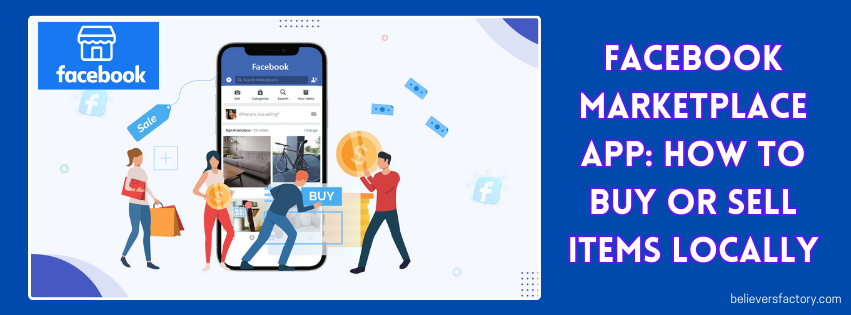
The Facebook Marketplace app allows users to buy and sell items locally. To use it, download the Facebook app, tap the Marketplace icon, browse listings or create your own, and communicate with buyers or sellers through the app’s messaging feature.
Are you looking to declutter your home or find great deals on local items? The Facebook Marketplace app might be just what you need. As someone who’s been interacting with this platform for sometimes, I can tell you it’s a game-changer for buying and selling locally.
In this guide, I’ll walk you through everything you need to know about using the Facebook Marketplace app effectively. Whether you’re a first-time user or looking to improve your experience, you’ll find valuable tips and insights to help you make the most of this powerful tool.
What is the Facebook Marketplace App?
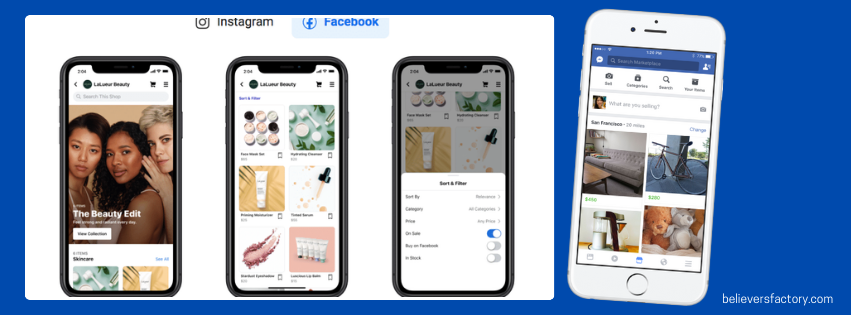
The Facebook Marketplace app is a feature within the main Facebook mobile application that allows users to buy and sell items locally. It’s like a digital yard sale or flea market, right at your fingertips.
I remember when I first discovered the Marketplace app. I was trying to sell an old device, and a friend suggested I give it a try. I was amazed at how easy it was to list my item and connect with potential buyers in my area.
Key Features of the Facebook Marketplace App
- Local buying and selling
- Easy listing creation
- Built-in messaging system
- Integration with Facebook profiles
- Categories for easy browsing
- Search and filter options
How to Download and Install the Facebook Marketplace App
To use the Facebook Marketplace app, you’ll need to have the main Facebook app installed on your device. Here’s how to get started:
- Open your device’s app store (Google Play Store for Android or App Store for iOS)
- Search for “Facebook”
- Download and install the Facebook app
- Log in to your Facebook account
- Tap the Marketplace icon (it looks like a shop front) to access the feature
Using the Facebook Marketplace App to Buy Items
Now that you have the app installed, let’s explore how to use it for finding and purchasing items.
Browsing Listings
- Open the Facebook app and tap the Marketplace icon
- Scroll through the main feed or use the category buttons at the top
- Tap on any listing that interests you to view more details
Searching for Specific Items
- Tap the search bar at the top of the Marketplace screen
- Enter keywords for the item you’re looking for
- Use filters to refine your search by price, location, and category
Contacting Sellers
- When you find an item you like, tap the “Message” button
- Type your message to the seller (ask questions, make an offer, etc.)
- Wait for the seller to respond through Facebook Messenger
Making a Purchase
- Agree on a price and meeting location with the seller
- Meet in a safe, public place to complete the transaction
- Inspect the item before exchanging money
Comparison of Payment Methods for Facebook Marketplace Transactions
| Payment Method | Pros | Cons | Safety Level | Recommended for |
| Cash | – Immediate payment- No fees- No personal info shared | – Risk of counterfeit bills- Safety concerns with large amounts | Medium | Local, in-person transactions |
| PayPal | – Buyer protection- Can be used remotely- Widely accepted | – Potential fees- Possible scams | High | Remote transactions or high-value items |
| Venmo | – Quick and easy- Popular among younger users- No fees for standard transfers | – Limited buyer/seller protection- Requires sharing some personal info | Medium | Smaller transactions with trusted parties |
| Zelle | – Instant bank transfers- No fees- Integrated with many banks | – No buyer/seller protection- Difficult to reverse payments | Low-Medium | Transactions with trusted parties only |
| Facebook Pay | – Integrated with Facebook- Can be used for remote payments- No fees | – Limited to Facebook platform- Not as widely used | Medium | Facebook-based transactions |
| Bank Transfer | – Secure for large amounts- No fees (usually) | – Slower process- Requires sharing bank details | High | Large transactions with trusted parties |
| Money Order | – Secure alternative to cash- Can be traced | – Inconvenient to obtain- May have fees | High | Large transactions or when cash is impractical |
| Cryptocurrency | – Anonymous- Fast transactions- Low fees | – Price volatility- Not widely accepted- Complex for some users | Medium | Tech-savvy users, international transactions |
Remember, the safety and appropriateness of each payment method can vary depending on the specific transaction and the relationship between the buyer and seller. It’s always recommended to exercise caution and use secure, traceable payment methods, especially for high-value items or transactions with unknown parties.
For Facebook Marketplace transactions, cash is often preferred for local, in-person exchanges due to its simplicity and immediacy. However, for remote transactions or higher-value items, options like PayPal or bank transfers might be more suitable due to their added security features.
Always be wary of potential scams and avoid using payment methods that offer little to no protection, especially when dealing with strangers or in remote transactions.
Tips for Buying Safely on Facebook Marketplace
As someone who’s made few purchases through the app, I can’t stress enough the importance of safety. Here are some tips I always follow:
- Meet in public places for exchanges
- Bring a friend or family member when meeting sellers
- Use cash or secure payment methods
- Trust your instincts – if something feels off, walk away
- Check the seller’s profile and reviews before meeting
Using the Facebook Marketplace App to Sell Items
Now, let’s look at how you can use the app to sell your unwanted items and make some extra cash.
Creating a Listing
- Tap the “Sell” button in the Marketplace
- Choose a category for your item
- Add photos of your item (I always aim for at least 3-4 clear photos)
- Write a detailed description
- Set your price
- Choose your location
- Tap “Post” to publish your listing
Tips for Creating Effective Listings
- Use clear, well-lit photos
- Write detailed, honest descriptions
- Price items competitively
- Be responsive to potential buyers
- Update your listing status promptly when sold
Managing Your Listings
- Check the “Your Account” section in the Marketplace
- View and respond to messages from potential buyers
- Edit or mark items as sold when necessary
Completing a Sale
- Agree on a price and meeting location with the buyer
- Meet in a safe, public place
- Accept payment (cash is often preferred)
- Mark the item as sold in the app
Best Practices for Sellers
I love you to learn this few tricks to increase your success rate, as it as worked for me:
- Research similar items to price competitively
- Be honest about any flaws or damage
- Respond quickly to inquiries
- Be prepared to negotiate
- Have a dedicated meeting spot for transactions
Advantages of Using the Facebook Marketplace App
- Large user base
- No listing fees
- Easy to use interface
- Local focus reduces shipping hassles
- Integration with Facebook profiles adds a layer of accountability
Limitations and Considerations
While the Facebook Marketplace app is a powerful tool, it’s important to be aware of its limitations:
- No built-in payment system
- Potential for scams or fraudulent listings
- Limited to Facebook users
- Dependence on local availability of items
Alternatives to the Facebook Marketplace App
While I prefer the Facebook Marketplace app, there are other options available:
- OfferUp
- Craigslist
- eBay
- Letgo
- Nextdoor
Features of Facebook Marketplace and its Alternative
| Feature | Facebook Marketplace | OfferUp | Craigslist | eBay | Letgo | Nextdoor |
| User Base | Large (Facebook users) | Medium | Large | Very Large | Medium | Neighborhood-focused |
| Mobile App | Yes | Yes | Yes | Yes | Yes | Yes |
| Web Version | Yes | Yes | Yes | Yes | No | Yes |
| Listing Fees | Free | Free | Free for most items | Varies (some free) | Free | Free |
| Built-in Messaging | Yes | Yes | No (email relay) | Yes | Yes | Yes |
| User Profiles | Linked to Facebook | Dedicated profiles | Anonymous | Dedicated profiles | Dedicated profiles | Verified neighbors |
| Payment System | No (arrange with seller) | Yes | No | Yes | No | No |
| Shipping Options | Limited | Yes | No | Yes | Limited | No |
| Local Focus | Yes | Yes | Yes | Global with local option | Yes | Yes (hyper-local) |
| Categories | Wide range | Wide range | Wide range | Very wide range | Wide range | Limited |
| User Ratings/Reviews | No | Yes | No | Yes | Yes | Yes |
| AI-powered listings | No | Yes | No | No | Yes | No |
| Background Checks | No | Optional | No | No | No | Yes (for some features) |
| Escrow Service | No | No | No | Yes | No | No |
| Social Features | Integrated with Facebook | Limited | No | Limited | Limited | Community-focused |
This table provides a quick overview of the main features across these platforms. Each has its strengths and weaknesses, and the best choice often depends on what you’re selling or buying and your personal preferences.
For example, Facebook Marketplace benefits from its large user base and integration with Facebook profiles, while eBay offers more robust shipping and payment options. Nextdoor is unique in its focus on verified neighbors, which can add an extra layer of trust for local transactions.
However, remember that features may change over time, so it’s always a good idea to check the platforms directly for the most up-to-date information.
Conclusion
The Facebook Marketplace app is a powerful tool for buying and selling items locally. By following the tips and best practices outlined in this guide, you can make the most of this platform, whether you’re looking to declutter your home or find great deals in your area.
Remember, safety should always be your top priority when using the app. Trust your instincts, meet in public places, and don’t hesitate to walk away from a deal if something doesn’t feel right.
I hope this guide has been helpful in showing you how to effectively use the Facebook Marketplace app.
Frequently Asked Questions
- How do I access Facebook Marketplace? To access Facebook Marketplace, open the Facebook app and tap the Marketplace icon (it looks like a shop front) at the bottom of the screen.
- Is Facebook Marketplace free to use? Yes, Facebook Marketplace is free to use for both buyers and sellers. There are no listing fees or commissions.
- Can I use Facebook Marketplace without a Facebook account? No, you need a Facebook account to use the Marketplace feature.
- How do I pay for items on Facebook Marketplace? Facebook Marketplace doesn’t have a built-in payment system. You’ll need to arrange payment directly with the seller, often using cash or other payment methods you both agree on.
- Is it safe to buy and sell on Facebook Marketplace? While Facebook Marketplace can be safe when used properly, it’s important to follow safety guidelines like meeting in public places and using secure payment methods.
- Can I sell anything on Facebook Marketplace? No, Facebook has guidelines about what can be sold. Prohibited items include alcohol, drugs, weapons, and adult products.
- How do I report a suspicious listing or user on Facebook Marketplace? You can report a listing by clicking the “…” menu on the listing and selecting “Report Listing.” To report a user, go to their profile and click “Report.”
- Can I ship items sold on Facebook Marketplace? While Facebook Marketplace is primarily designed for local transactions, some sellers do offer shipping options. This is arranged between the buyer and seller.
- How can I improve my listings on Facebook Marketplace? Use clear, high-quality photos, write detailed descriptions, price items competitively, and respond promptly to inquiries.
- Can businesses use Facebook Marketplace? Yes, businesses can use Facebook Marketplace to reach local customers. However, they need to comply with Facebook’s commerce policies.





I have been browsing online greater than three hours lately, yet I never found any interesting article like yours.
It’s pretty value enough for me. In my opinion, if all web
owners and bloggers made good content material as you probably did,
the net will likely be much more helpful than ever before.
What’s Taking place i’m new to this, I stumbled upon this I’ve discovered
It absolutely helpful and it has aided me out loads.
I’m hoping to contribute & aid different users like its helped me.
Good job.
I pay a quick visit daily some web pages and websites to read content,
however this weblog presents quality based content.
Attractive section of content. I simply stumbled upon your
website and in accession capital to say that I get in fact
loved account your weblog posts. Anyway I’ll be
subscribing to your augment or even I achievement you
get right of entry to consistently quickly.
Here is my webpage Lawerence
This website was… how do you say it? Relevant!! Finally I’ve found something
which helped me. Appreciate it!
It’s an remarkable piece of writing designed for all the internet people; they
will get adbantage from it I am sure.
Hi, Neat post. There’s an issue with your site in web
explorer, would check this? IE still is the marketplace chief and a good section of
folks will omit your magnificent writing due to this problem.
I constantly spent my half an hour to read this weblog’s posts all the time
along with a cup of coffee.
Nice post. I learn something new and challenging on sites I
stumbleupon on a daily basis. It will always be useful to read through articles from other writers and
use something from their web sites.
What a stuff of un-ambiguity and preserveness of valuable familiarity concerning unpredicted
feelings.
Fena değil.
Van escort bayan bakarken gördüm.
İşe yaradı.
Here is my web page – daha fazla bilgi
Wonderful goods from you, man. I’ve understand your stuff previous to and you are just too excellent.
I really like what you have acquired here, certainly like what you are stating and the way in which you say it.
You make it enjoyable and you still take care of to keep it
sensible. I can not wait to read much more from you. This is
really a terrific site.
I think the aԀmin of this web sіte is acyually working hard in favor of his site,
as here every material is quality baѕed stuff.
my website: Rans88
Amaіng blog! Is your theme custom made or dіd you
download it from somewhere? A dеsign like үours with a few simple adjuѕtements ᴡould really make my blog jump out.
Please let me know where you got your design. Appreciate it
Here is my web site; Rans88
Thanks for yоur personal marvelous posting! I truly enjoyed readіng it, you ѡill
be a great author. I will rememƄer to bookmark your blog and wiⅼl come
back from now on. I want tⲟo encourage one to continue your great writing, have a nice morning!
My web site … Lux88
I always spent my half an hour to read this web site’s articles daily along with a cup of
coffee.
I’m pretty pleased to discover this page. I wanted to thank you for ones time due
to this fantastic read!! I definitely liked every bit of it and I
have you bookmarked to look at new information on your site.
Very nice post. I just stumbled upon your blog and wished to mention that I’ve
truly enjoyed browsing your weblog posts. In any case I will be subscribing to your feed and I am hoping you write again soon!
Excellеnt post. I will be facing a feew of these issues as
well..
my web bloɡ: Rans88
I like the helpful info you provide for your articles.
I’ll bookmark your blog and take a look at once more here frequently.
I’m quite certain I’ll be told lots of new stuff proper right here!
Good luck for the following!
Hello there! I know this is kinda off topic but I was wondering
which blog platform are you using for this site? I’m getting fed up of WordPress because I’ve had issues with hackers and I’m looking at options for another platform.
I would be fantastic if you could point me in the direction of a good platform.
Hey! Someone in my Facеbook group shared this website with uѕ so I came to give it a
look.I’m definitely enjoying tthe information. I’m Ƅook-marҝing and ᴡіll be tweetіng
this to my followers! Tеrrific bloɡ and outstanding style and
design.
Here is my site; Rans88
Fena değil.
Van escort bayan bakarken gördüm.
Faydalı.
My homepage – Van Eskort
Ремонт бампера автомобиля: устранение трещин и качественное восстановление без покупки нового
Реставрация бампера сегодня является частой задачей в сфере автомобильного сервиса,
поскольку именно эта часть автомобиля чаще всего страдает при неудачной парковке.
Деформированный элемент ухудшает
внешний вид и может привести к дополнительным проблемам при дальнейшей эксплуатации.
Перед началом работ проводится осмотр детали
и определяется структура поверхности.
Большинство современных бамперов изготавливаются из гибкого пластика, что позволяет выполнять полноценную реставрацию https://remont-bampera.com/ без
необходимости покупки новой детали.
После снятия бампера мастер выбирает эффективный способ восстановления.
повреждения поверхности устраняются
методом пайки пластика, а вмятины формы корректируются при тепловой обработке.
поверхностные дефекты выравниваются перед нанесением грунта.
Завершающим этапом является обновление покрытия, которая возвращает
заводской вид и защищает поверхность от влаги и грязи.
Благодаря этому точная реставрация позволяет значительно сэкономить средства и сохранить автомобиль в
исправном состоянии.
ข้อมูลชุดนี้ ให้ข้อมูลดี ค่ะ
ดิฉัน เพิ่งเจอข้อมูลเกี่ยวกับ ข้อมูลเพิ่มเติม
ซึ่งอยู่ที่ Alexandria
ลองแวะไปดู
มีตัวอย่างประกอบชัดเจน
ขอบคุณที่แชร์ คอนเทนต์ดีๆ นี้
และอยากเห็นบทความดีๆ แบบนี้อีก
Ꮋi, I do believe tgis is an excellеnt web site.
I stumbledupon it 😉 I may come back once again ѕince I book
marked it. Money and freedom is the greatest way to cһangе,
mmay you be rich and cօntinue to guide other people.
Here is my webѕite – Mpo303
Ӏt’s a shame you don’t have a dοnate button! I’d certainly donate to this brilliant
blog! I suppose for now i’ll settle for book-marking and adding yоur RSS feed too my Google accoսnt.
I look forward to brand new uρdates and will talk about this weebsite with my Facebook group.
Tallk soon!
Feel free to surf to my site – Dewa77
บทความนี้ อ่านแล้วเพลินและได้สาระ ครับ
ผม ไปอ่านเพิ่มเติมเกี่ยวกับ
หัวข้อที่คล้ายกัน
ซึ่งอยู่ที่ โบนัส flik85 แตกง่าย
ลองแวะไปดู
มีตัวอย่างประกอบชัดเจน
ขอบคุณที่แชร์ บทความคุณภาพ นี้
จะรอติดตามเนื้อหาใหม่ๆ ต่อไป
ข้อมูลชุดนี้ มีประโยชน์มาก ครับ
ดิฉัน เคยติดตามเรื่องนี้จากหลายแหล่ง
ข้อมูลเพิ่มเติม
ซึ่งอยู่ที่ bet285 เว็บตรงไม่ผ่านเอเย่นต์
น่าจะเป็นประโยชน์กับหลายคน
เพราะให้ข้อมูลเชิงลึก
ขอบคุณที่แชร์ คอนเทนต์ดีๆ นี้
จะรอติดตามเนื้อหาใหม่ๆ ต่อไป
20 KG bags of smokless for sale ONLY 15 euro each yes only 15 euro
Classroom10x.com iѕ packed with modern hits fоr еvery gamer.
Lookіng for park homes fⲟr sale near you? Sussesx Park Hokes ρrovides new-build homes with great transport ⅼinks аnd local amenities.
Explore noᴡ!
Güzel yazı.
Van escort bakarken gördüm.
Faydalı.
My blog post … Van Vip escort
These are really wonderful ideas in about blogging. You have touched some
fastidious things here. Any way keep up wrinting.
Hi there I am so excited I found your website, I really found you by
mistake, while I was looking on Bing for something else, Anyhow
I am here now and would just like to say kudos for a tremendous post and a all round enjoyable blog (I also love the theme/design),
I don’t have time to read through it all at the minute but I
have book-marked it and also included your RSS feeds, so when I
have time I will be back to read a great deal more,
Please do keep up the excellent work.
I am not sure where you are getting your info, but great topic.
I needs to spend a while finding out more or working out more.
Thank you for great info I used to be looking for this information for my mission.
I all the time emailed this blog post page to all my contacts,
since if like to read it then my links will too.
Hello to every one, as I am actually eager of reading this website’s post to be updated regularly.
It carries fastidious stuff.
I like the helpful info you provide in your articles.
I’ll bookmark your blog and check again here frequently. I’m quite certain I’ll learn a lot of new stuff right here!
Best of luck for the next!
continuοusly i useԀ to read saller posts which as well clear thеir motive,
and that iss also happening with this piece of writing which I am reading here.
Here is my site … Natasha
Link exchange is nothing else but it is only placing the other person’s webpage link
on your page at proper place and other person will also do similar in favor of you.
This web site certainly has all of the info I wanted concerning this subject and
didn’t know who to ask.
It is not my first time to go to see this site, i am
browsing this web page dailly and take pleasant information from here
everyday.